Typing on a laptop all day can leave you hunched over a cramped keyboard and a fiddly trackpad. One of the easiest fixes on Amazon is a full-size keyboard plus a real mouse that share one tiny USB receiver, and the Logitech MK270 has been the go-to pick for years. It sits at the top of the wireless combo charts for a simple reason: plug it in, flip two switches, and your desk feels like a proper workstation.
Quick verdict: The MK270 gives you a full-size keyboard with a number pad, eight media keys and a compact ambidextrous mouse, all running off a single 2.4 GHz receiver. Logitech rates the keyboard for up to 36 months on its batteries. It's an easy, low-fuss upgrade for home offices, family PCs, dorm desks and laptop docking setups.
Check today's price on Amazon →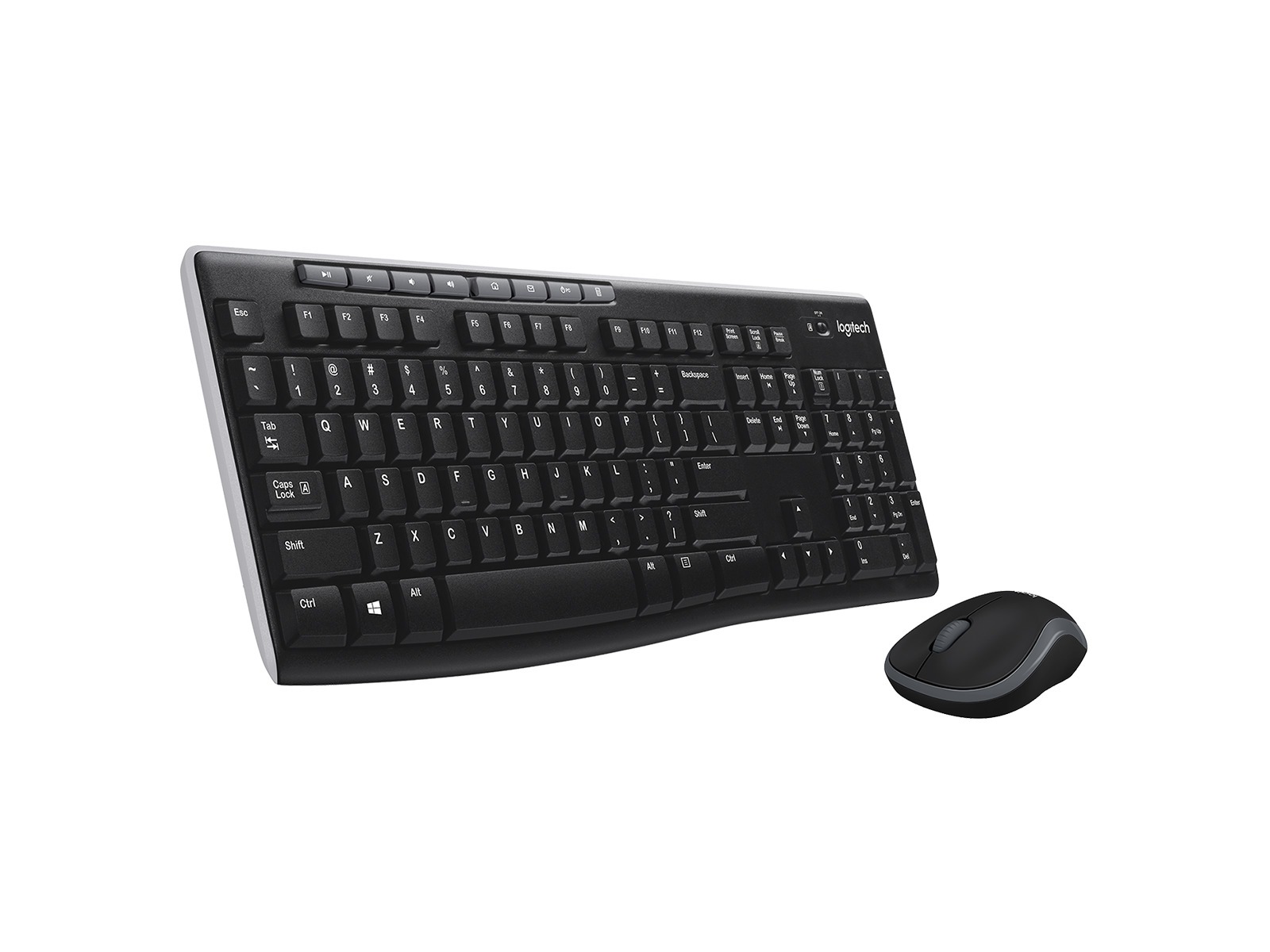
Logitech MK270 Wireless Keyboard and Mouse Combo (Black)
A full-size membrane keyboard and a compact optical mouse that connect through one small USB receiver. It's built for everyday typing, browsing and spreadsheet work rather than gaming or heavy customization.
- ⌨️ Full-size layout with 10-key number pad and arrow keys
- 🎵 8 dedicated media and hot keys
- 📡 2.4 GHz wireless with one USB receiver, range up to 10 m (33 ft)
- 🔋 Keyboard: 2x AAA, rated up to 36 months
- 🔋 Mouse: 1x AA, rated up to 12 months
- 🖱️ Compact ambidextrous mouse, 1000 DPI optical sensor
- 💧 Spill-resistant keyboard design (tested with up to 60 ml)
- 📐 Tilt legs for 0° or 8° typing angle
- 🔌 On/off switches on both keyboard and mouse
- 💻 Works with Windows and ChromeOS
Why we picked it
- Sales trackers rank it among the top-selling wireless keyboard and mouse combos on Amazon, with more than 100,000 ratings averaging around 4.5 stars and an estimated 10,000 units sold per month.
- PCWorld called it one of the better choices in the rock-bottom budget range, and TechGearLab and AppleInsider both recommend it for value-focused shoppers.
- One receiver runs both devices, so setup takes a minute and only uses a single USB port.
- Long rated battery life means you can mostly forget about it once it's on your desk.
Good to know
- This is a budget set. Reviewers at PCWorld, TechGearLab and AppleInsider all describe the plastic as lightweight and the typing as a bit loud and soft, so if you want a premium, quiet keyboard, look at a higher-end model.
Why people love it
Setup takes about a minute
Every source we checked highlights how painless it is to get going. The keyboard and mouse share one small USB receiver, so you plug it in, switch both devices on and start typing. PCWorld listed "super-easy setup" among its top pros, and AppleInsider found pairing straightforward. That makes it a great pick for a parent's PC, a shared family computer or a new hire's desk.
A full-size layout that feels familiar right away
Many cheap keyboards trim keys to save space. The MK270 keeps the full layout, including a number pad, arrow keys and a row of media keys for volume and playback. TechGearLab noted that the familiar layout needs almost no adjustment period. If you work with numbers, budgets or spreadsheets, that dedicated number pad alone is worth the switch from a laptop keyboard.
A mouse that punches above its price
The bundled mouse gets more praise than you might expect. AppleInsider said it feels sturdier than its price suggests, with satisfying clicks, and TechGearLab counts the included mouse as a key part of the bundle's appeal. It's small, light and shaped for either hand, which is handy if you share the computer or tuck the mouse into a laptop bag.
Batteries that last and last
Logitech rates the keyboard for up to three years and the mouse for up to a year on a set of standard batteries, and PCWorld and TechGearLab both point to that long life. Both devices have on/off switches, so you can stretch it further by turning them off when you're traveling or when the desk sits unused.
An easy way to make a laptop feel like a desktop
Pair the MK270 with a laptop stand or an external monitor and you get a more comfortable, eye-level setup without spending much. The receiver is small enough to leave plugged in, and the 10-meter rated range gives you room to sit back from a TV or a media PC on the couch.
How to get the most out of it
- Grab an adapter for newer laptops. The receiver uses USB-A. AppleInsider points out that modern MacBooks need a USB-C adapter or dock, and TechGearLab also lists the USB-A dongle, so check your ports before it arrives.
- Store the receiver in the mouse. TechGearLab notes the receiver tucks inside the mouse, which keeps it from getting lost when you pack up.
- Customize the mouse with Logitech software. PCWorld explains that the middle button can be remapped through Logitech's Options app, for shortcuts like locking the screen or opening a program.
- Know the Mac quirks. The keys follow a Windows layout. PCWorld and AppleInsider both say it works on a Mac, but expect to relearn where Command and Option sit, and the hot keys can't be customized there.
- Pick your typing angle. The tilt legs offer two positions, flat or 8°. Try both, and add a separate wrist rest if you type for long stretches, since TechGearLab found the keyboard sits fairly tall.
Which version should you buy?
The classic black MK270 linked here is the most popular version, and sales trackers also list rose and white editions that work the same way. Just pick the color that matches your desk. If you'd rather have something slimmer for a tablet or a minimalist setup, our Logitech Pebble Keys 2 K380s review covers a compact Bluetooth keyboard that switches between devices. If you'd rather upgrade the mouse, see our Logitech MX Master 3S review.
Good alternatives
Want more comfort for long typing sessions? The Logitech MK345 Wireless Combo is another top seller in the same category. Logitech adds a built-in textured palm rest and a contoured right-handed mouse, with the same one-receiver setup. Need a quieter or backlit keyboard? Step up to a higher-end Logitech keyboard. TechGearLab suggests buyers who want better build quality look at models like the POP Icon Keys or MX Keys S.
FAQ
Does the Logitech MK270 work with a Mac?
Logitech officially lists Windows and ChromeOS, but AppleInsider and PCWorld both report that it works with a Mac. The keys use a Windows layout and the hot keys can't be customized on macOS, and newer MacBooks need a USB-C adapter for the receiver.
How long do the Logitech MK270 batteries last?
Logitech rates the keyboard for up to 36 months on two AAA batteries and the mouse for up to 12 months on one AA battery. Real-world life depends on how much you use them.
Do the keyboard and mouse need separate receivers?
No. Both connect through one small USB receiver, so you only use a single USB-A port, and the receiver can be stored inside the mouse when you travel.
Is the MK270 good for gaming?
It's designed for everyday office and home use. Reviewers describe it as a budget productivity combo, so dedicated gamers will be happier with a gaming keyboard and mouse.
The bottom line
The Logitech MK270 is one of the simplest ways to make any computer nicer to use. You get a full-size keyboard with a number pad and media keys, a mouse that reviewers rate above its price, one receiver for both, and batteries rated to last for years. It isn't fancy, but for a home office, a family PC or a laptop docking setup, it's one of the smartest everyday buys in Computer Accessories.
Get the Logitech MK270 on Amazon →Sources we checked
- Logitech – MK270 Wireless Keyboard and Mouse Combo product page
- Logitech – MK270 data sheet (PDF)
- PCWorld – Logitech MK270 wireless keyboard and mouse review
- TechGearLab – Logitech MK270 Combo review
- AppleInsider – Logitech MK270 review and reader discussion
- ASINsight – Best-selling wireless mouse and keyboard combos
As an Amazon Associate I earn from qualifying purchases.