Typing a long email on a phone screen, or hunching over a tablet's glass keyboard, gets old fast. The Logitech Pebble Keys 2 K380s is a slim, quiet Bluetooth keyboard that pairs with three devices at once and hops between them with a single key. Throw it in a bag, set it next to your iPad or laptop, and suddenly every screen in your life becomes a comfortable place to type.
Quick verdict: For students, remote workers and tablet owners who want one affordable keyboard for everything, the K380s is a standout. It's compact, near-silent, runs for years on two AAA batteries and switches between computer, tablet and phone in a tap.
Check today's price on Amazon →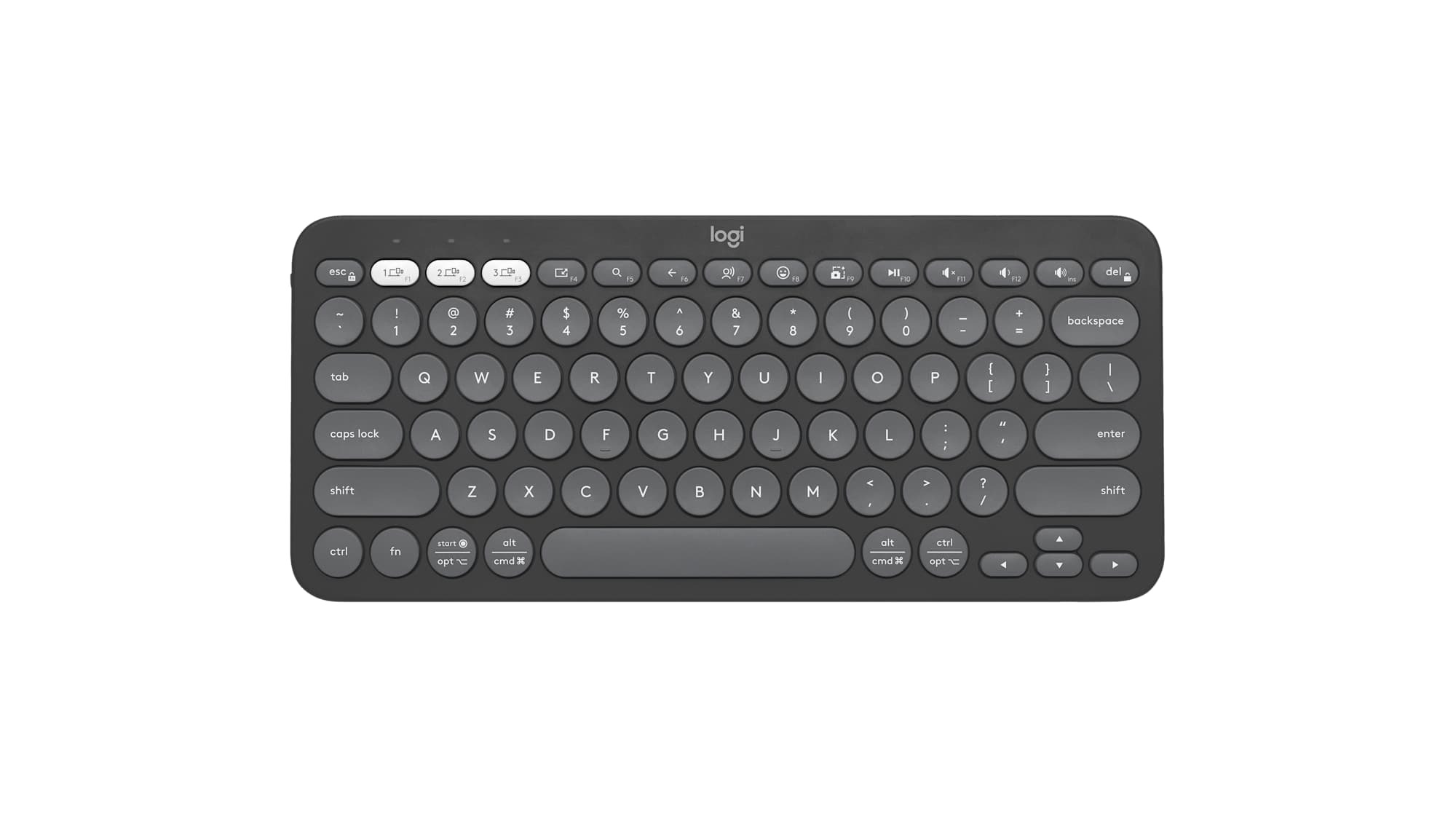
Logitech Pebble Keys 2 K380s (Tonal Graphite)
The updated version of Logitech's hugely popular K380: a compact Bluetooth keyboard with rounded keys, three device channels and customizable shortcuts through the free Logi Options+ app.
- 🔁 Pairs with up to 3 devices; switch with dedicated Easy-Switch keys
- 🔋 Up to 36 months of battery life on 2 AAA batteries (included)
- 💻 Works with Windows, macOS, iPadOS, iOS, Android and ChromeOS
- ⌨️ Customizable function row, plus emoji and screenshot shortcuts
- ♻️ Made with recycled plastic (more than half, according to Logitech)
Why we picked it
- Tom's Guide, Windows Central and Trusted Reviews all praise its portability, quiet typing and very long battery life.
- It holds a 4.4-star average across thousands of Amazon ratings, according to deal trackers, and 93% of Best Buy reviewers say they'd recommend it.
- Multi-device switching is fast and reliable, so one keyboard can serve your laptop, tablet and phone.
- Windows Central calls it one of the best wireless keyboards you can get for around $40.
Good to know
- The round keys take a day or two to get used to and there's no backlight; if you type in the dark a lot, a backlit model like Logitech's MX Keys Mini is the step-up pick.
Why people love it
One keyboard, three screens
This is the feature owners rave about most. Pair your laptop, tablet and phone to the three channel keys, then tap a key to jump between them. Windows Central found the switching quick with no lag or dropped connections, and Best Buy reviewers repeatedly mention trouble-free multi-device use. Reply to a text on your phone, then jump straight back to your document without touching the screen.
Battery life you can forget about
Logitech rates the K380s for up to three years on a pair of AAA batteries, a year more than the original K380. Windows Central saw almost no drain over weeks of use, and Trusted Reviews highlights it as a major plus. No charging cables, no low-battery panic before a meeting.
Quiet, comfortable typing
The low-profile keys are soft and quiet, which makes the K380s a good fit for shared offices, libraries and late-night couch sessions. Tom's Guide found the keypress less tiring than a thin laptop keyboard, and Trusted Reviews describes it as comfortable with decent feedback.
Slim enough to live in your bag
It's compact and weighs under a pound, so it slides into a backpack or laptop sleeve with room to spare. Reviewers and Best Buy owners alike call out its portability as the reason it goes everywhere with them, and the compact layout frees up desk space for your mouse.
Shortcuts that save time
The function row includes handy shortcuts, such as emoji and screen capture, and you can remap them in Logi Options+. Tom's Guide and Trusted Reviews both point to app-specific shortcut setups as a nice bonus at this price.
How to get the most out of it
- Pair all three channels on day one. Assign one each to your computer, tablet and phone so switching becomes second nature.
- Install Logi Options+. On Windows or Mac, use it to customize function keys and create app-specific shortcuts.
- Know the Fn + Esc trick. It toggles the top row between media/shortcut keys and standard F-keys.
- Give the round keys a few days. Reviewers agree accuracy improves quickly once your fingers adjust.
- Add a Logi Bolt receiver if you like. It's sold separately and offers an alternative to Bluetooth, handy if you already use a Logitech Bolt mouse.
Which version should you buy?
The Tonal Graphite (linked) is the most versatile color for any desk. Logitech also makes it in white and rose if you want something brighter. If you also need a mouse, Logitech sells a Pebble 2 Combo that pairs this keyboard with a matching compact mouse. Want backlit keys and a more premium feel? Look at the MX Keys Mini.
Good alternatives
Building a productive desk setup? Pair the K380s with the Logitech MX Master 3S (Pick #18), which also switches between three devices, and keep big files handy on the pocket-size Samsung T7 SSD (Pick #24).
FAQ
Does the K380s work with iPad?
Yes. It connects over Bluetooth to iPadOS and iOS, as well as Windows, macOS, Android and ChromeOS.
Is the K380s rechargeable?
No. It runs on two AAA batteries, which are included, and Logitech rates battery life at up to 36 months.
Does it come with a USB receiver?
No. It connects by Bluetooth out of the box. It's compatible with Logitech's Logi Bolt receiver, which is sold separately.
What's the difference between the K380 and K380s?
The K380s adds longer battery life (up to 36 months versus 24), customizable shortcut keys through Logi Options+ and a refreshed design with recycled plastic.
The best tech often makes things simpler. The Pebble Keys 2 does exactly that: one quiet, pocket-friendly keyboard that turns your laptop, tablet and phone into a single, comfortable workspace for years on one set of batteries.
Get the Logitech Pebble Keys 2 K380s on Amazon →
Sources we checked
- Logitech: Pebble Keys 2 K380s product page
- Tom's Guide: Logitech Pebble Keys 2 K380s review
- Windows Central: Pebble Keys 2 (K380s) review
- Trusted Reviews: Logitech Pebble Keys 2 K380s review
- Best Buy: customer reviews
As an Amazon Associate I earn from qualifying purchases. Product image: Logitech.