Thin laptops are wonderful right up until you need to plug in a monitor, a mouse and a flash drive at the same time. That's the everyday headache the UGREEN Revodok 105 fixes. This pocket-size aluminum hub turns a single USB-C port into HDMI, three USB-A ports and a 100W charging input, and it's one of the top sellers in Amazon's laptop docking category for good reason.
Quick verdict: The Revodok 105 is the budget-friendly fix for MacBook, Windows and Chromebook owners who want to connect one external display and a few USB accessories while keeping the laptop charged. It's perfect for students, home-office workers and travelers who want a tidy setup without a bulky dock.
Check today's price on Amazon →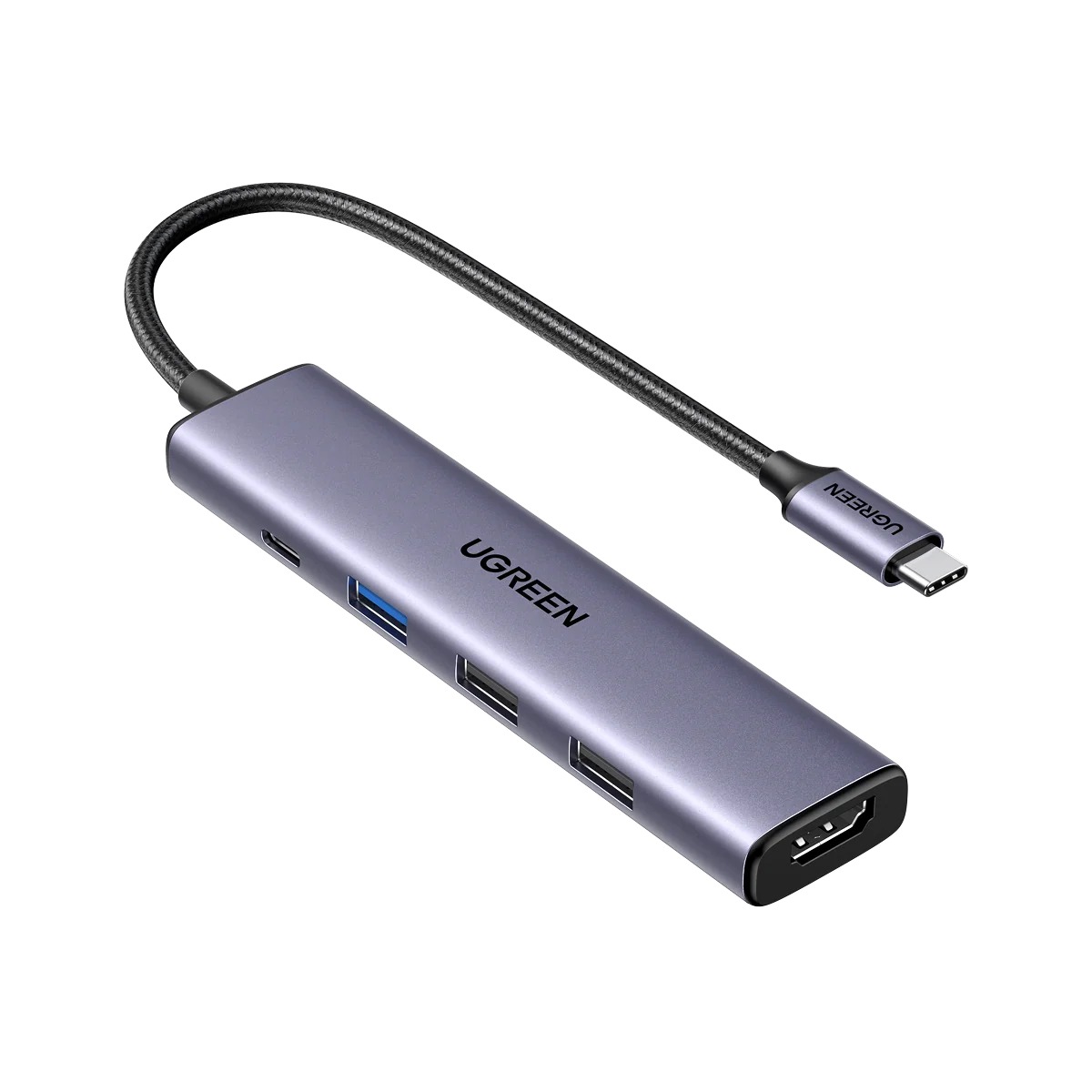
UGREEN Revodok 105 USB-C Hub, 5-in-1 (Gray)
A slim multiport adapter with an attached braided USB-C cable. It adds a 4K HDMI output, one fast USB-A 3.0 port, two USB-A 2.0 ports and a USB-C power input that passes charging through to your laptop.
- 🖥️ HDMI output up to 4K at 30Hz
- ⚡ USB-C Power Delivery input, up to 100W pass-through charging
- 💾 1 × USB-A 3.0 (5Gbps) + 2 × USB-A 2.0
- 🧱 CNC aluminum body, about 0.47 in thin
- 💻 Works with macOS, Windows, ChromeOS, Linux and iPadOS
Why we picked it
- Shopping trackers rank it in the top three of Amazon's Laptop Docking Stations category, with more than 25,000 ratings averaging about 4.6 stars.
- MightyGadget, docking-stations.info and other independent reviewers call it excellent value from a well-known accessories brand.
- Pass-through charging means you can run a monitor and accessories without giving up your laptop's only charging port.
- Reviewers measured the USB 3.0 port hitting its rated speed with an external SSD.
Good to know
- HDMI runs at 4K 30Hz (smooth at 1080p, a little less fluid for fast scrolling at 4K); if you want 4K 60Hz, Ethernet or card readers, step up to UGREEN's Revodok 107 7-in-1.
Why people love it
A full desk setup through one cable
Plug the hub in and your laptop suddenly drives an external monitor, a wired keyboard and mouse, and a flash drive or SSD. Reviewers at MightyGadget and limteam both describe it as covering exactly what a typical home office or dorm desk needs, so you can sit down, connect one cable and get to work.
Your laptop keeps charging
The USB-C PD port accepts up to 100W from your existing charger and passes power through to the laptop while everything else stays connected. Shoppers rank this as the feature they appreciate most, and reviewers note it's what makes the hub workable on ultrabooks with only one or two ports.
Fast where it matters
The blue USB-A 3.0 port moves files at up to 5Gbps. MightyGadget measured it reaching that rated speed with an external SSD, and limteam saw clearly faster drive transfers than on the slower ports. Use the two USB 2.0 ports for keyboards, mice and webcams, which don't need the extra speed.
Small, solid and travel-ready
The aluminum shell feels sturdier than plastic dongles, and the braided cable is built to handle being stuffed into a bag every day. Reviewers mention how easily it slips into a laptop sleeve, which makes it a great companion for coffee-shop work, hotel rooms and conference presentations.
Big brand, small price
UGREEN is one of the most established names in charging and connectivity gear, and reviewers repeatedly point out how much you get for the money. It's an easy add-on to a new laptop purchase, or a smart gift for a student heading back to class.
How to get the most out of it
- Check your laptop's USB-C port first. HDMI only works if your laptop's USB-C port supports video output (DisplayPort Alt Mode or Thunderbolt). Most MacBooks and many recent Windows laptops do; your spec sheet will say.
- Use a strong enough charger. The hub uses a little power for itself, so plug in a USB-C charger rated a bit above what your laptop normally needs to avoid "slow charger" warnings.
- Put drives on the blue port. SSDs and flash drives belong on the USB 3.0 port; keyboards, mice and receivers are happy on the USB 2.0 ports.
- Keep power steady during big jobs. UGREEN advises against plugging or unplugging the charger mid-transfer or while screen sharing, so connect power first.
- Set your display to 1080p if 4K feels sluggish. At 1080p the picture stays smooth and sharp for everyday work.
Which version should you buy?
The Revodok 105 5-in-1 is the best pick if you need one monitor, a few USB-A gadgets and charging, especially for travel. If you work at a desk all day with a 4K monitor, want wired Ethernet, or move photos from camera cards, the larger Revodok 107 7-in-1 adds 4K at 60Hz, Gigabit Ethernet, SD/microSD slots and a second USB 3.0 port. Need two external monitors? Look at a dedicated dual-display dock instead.
Good alternatives
Need a charger to pair with it? The UGREEN Nexode Air 65W (Pick #1) is a tiny GaN charger that's a natural match for the hub's power input. Want the fastest thing to plug into that USB 3.0 port? The Samsung T7 Portable SSD (Pick #24) makes backups and big file transfers quick.
FAQ
Does the UGREEN Revodok 105 work with a MacBook?
Yes. It works with USB-C MacBook Air and MacBook Pro models, as well as Windows laptops, Chromebooks and iPads with USB-C video output.
Can it charge my laptop?
Yes. Connect your USB-C charger to the hub's PD port and it passes up to 100W through to your laptop. A charger isn't included.
Does the HDMI port support 4K?
It outputs up to 4K at 30Hz. That's great for documents and video; gamers and fast-scrolling users may prefer a 4K 60Hz hub.
Can I use the USB-C port on the hub for data?
No. That USB-C port is for charging input only; use the USB-A ports for drives and accessories.
The bottom line
The UGREEN Revodok 105 is the little adapter that makes a thin laptop feel like a full workstation. One cable gives you a big screen, your favorite accessories and charging, and it costs less than most laptop bags. If your USB-C ports are always one short, this is the easy, crowd-tested fix.
Get the UGREEN Revodok 105 on Amazon →Sources we checked
- UGREEN – 5-in-1 USB-C Hub (Revodok 105) product page
- MightyGadget – UGREEN Revodok 105 review
- docking-stations.info – Revodok 105 review
- My Helpful Hints – Revodok 105 review
- limteam – long-term Revodok 105 review
- desertcart – listing details and category rank
As an Amazon Associate I earn from qualifying purchases.